Bookmarkley Documentation
The best bookmarklet tool to control and alter the content of a webpage.
The best bookmarklet tool to control and alter the content of a webpage.
Lets get started with Bookmarkley. Getting started with Bookmarkley is fairly simple, if you follow the instructions down below you will be all set.
Bookmarkley is your key to configuration and customization of any webpage. Before we Get Started, heres what Bookmarkley does, and does not do.

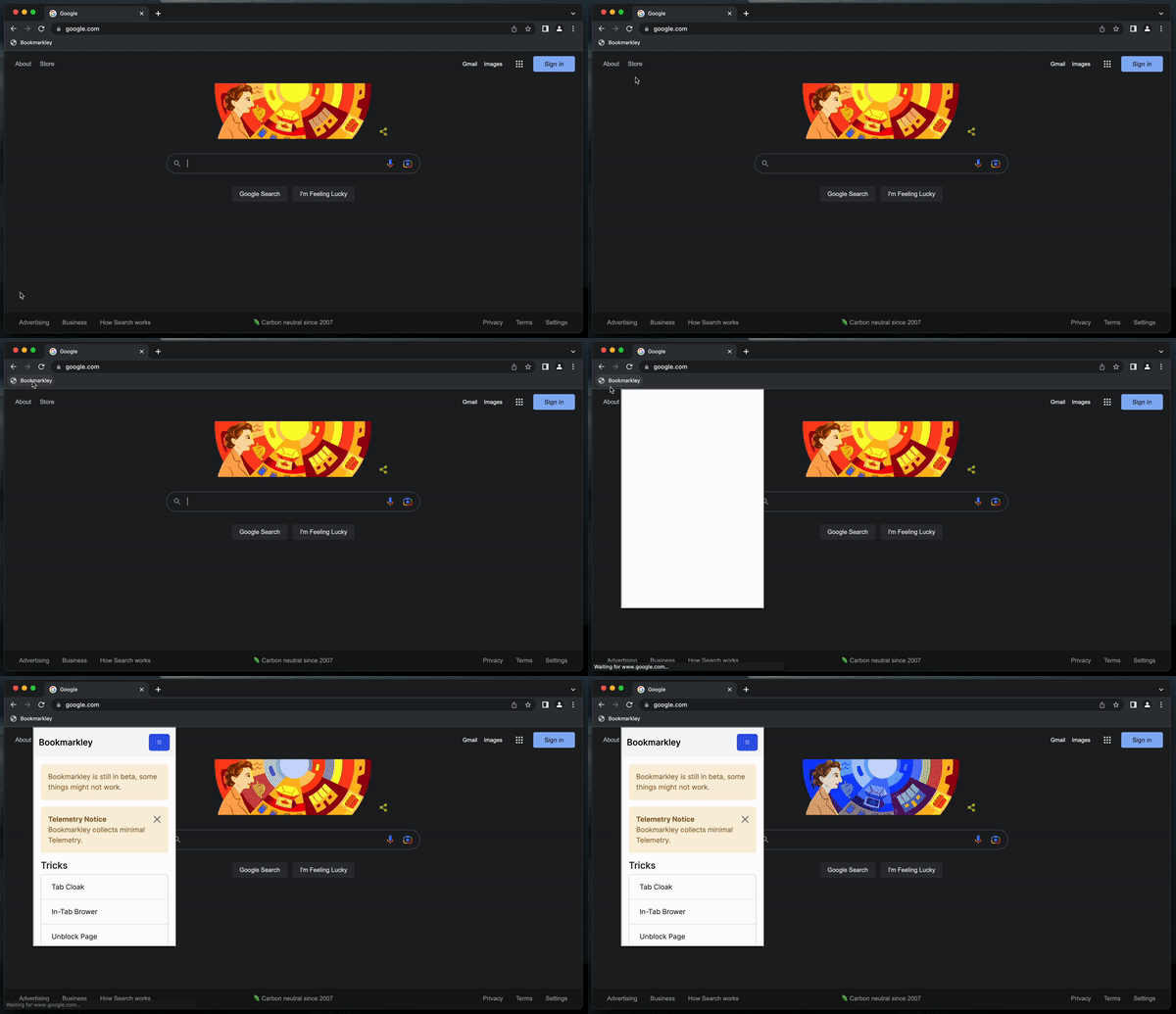
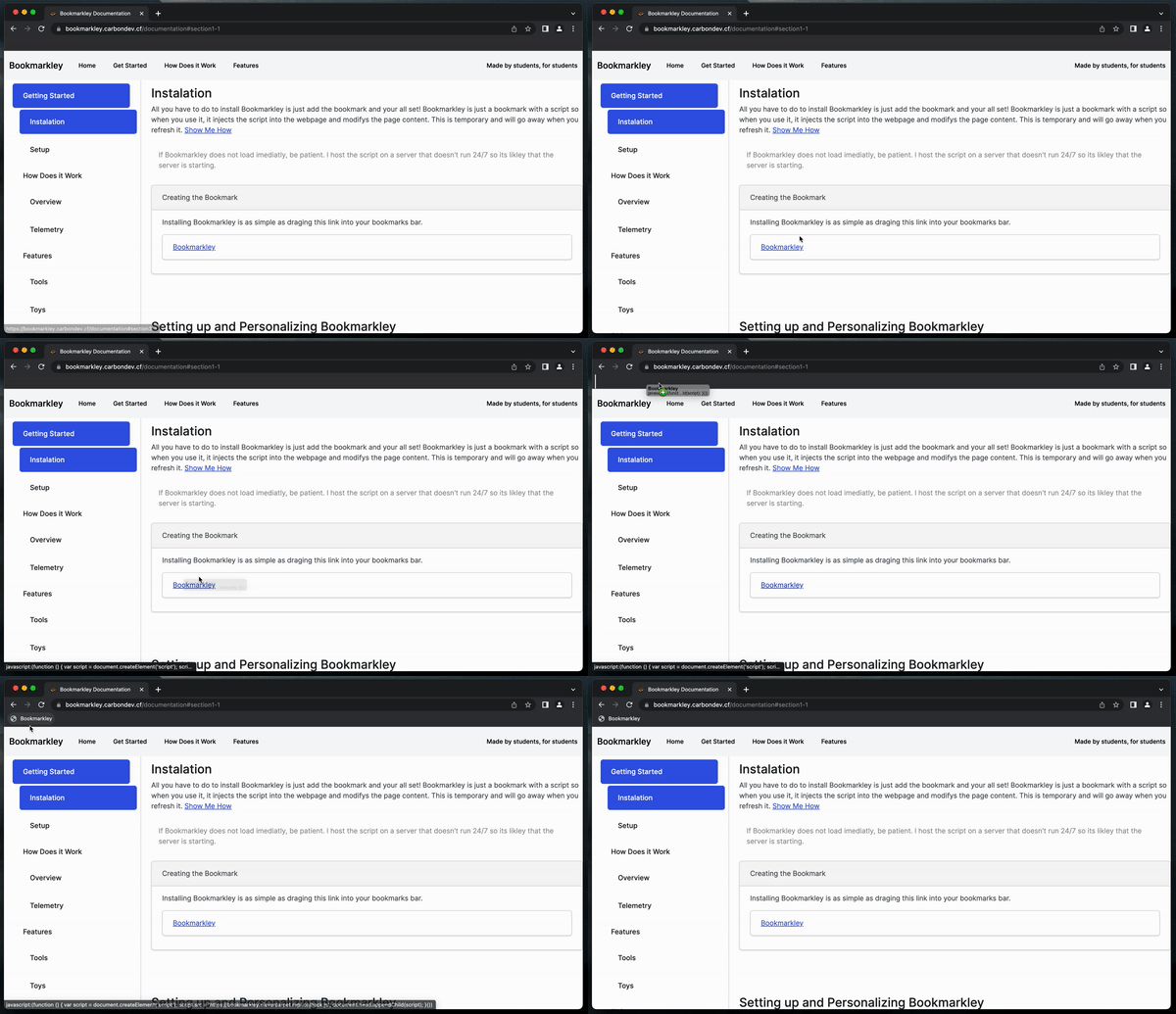
All you have to do to install Bookmarkley is just add the bookmark and your all set! Bookmarkley is just a bookmark with a script so when you use it, it injects the script into the webpage and modifys the page content. This is temporary and will go away when you refresh it. Show Me How
Lets personalize Bookmarkley to suit you. Personalizing Bookmarkley looks a lot different than other software/extensions. To personalize Bookmarkley, we are gonna use a tool we made to generate a bookmark for you. Since Bookmarkley isn't installed locally, we store your settings in the script so every time you use it, it loads your configuration when loading the script. Show Me How
Select your options and then generate your script.
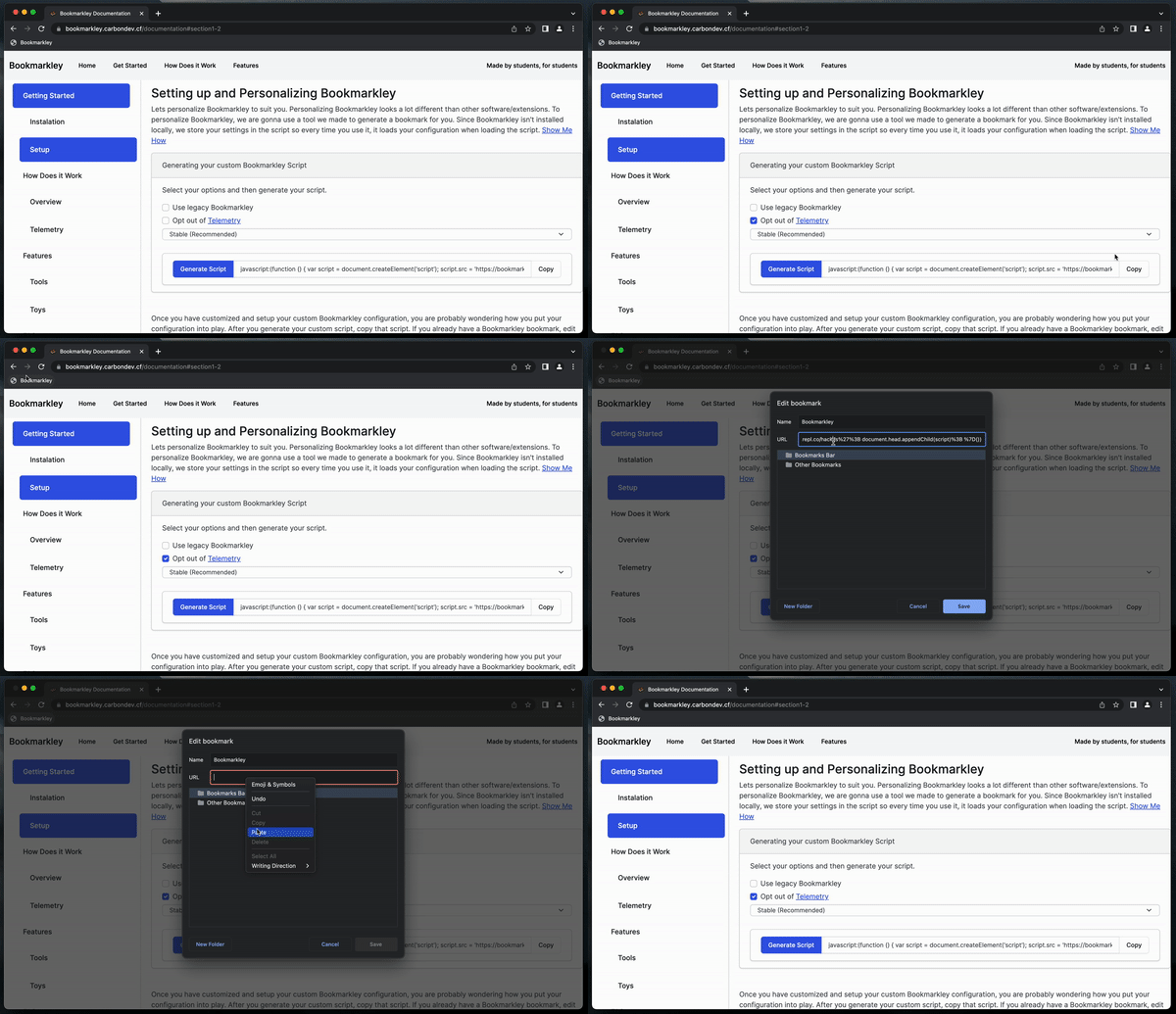
Once you have customized and setup your custom Bookmarkley configuration, you are probably wondering how you put your configuration into play. After you generate your custom script, copy that script. If you already have a Bookmarkley bookmark, edit that bookmark and replace the existing script with your new one. If you don't already have a Bookmarkley bookmark, either follow the earlier instructions or create a new bookmark yourself, name it whatever, and then copy your custom script into the URL input.
Bookmarkley is a bookmarklet script. When you click the bookmark, it injects a custom script into any webpage you are on and modifys the content. Bookmarkley trys to achive an extension like UI that is user friendly, and allows you to use features without sacraficing website usage or breaking anything. This is going to be hard to accomplish due to Bookmarkley having to be inject into the website. We make the interface by creating a DIV with an iFrame loading the HTML UI. The UI then sends commands the parent script that is on the page and then exectues the scripts.

Bookmarkley does not track you. The only information we collect is,
Telemetry really helps us improve Bookmarkley at no cost to you. Nothing about you personally is stored. We collect a tiny bit of information from each user so we can build graphs and data to see what our users are like. We use this information to make Bookmarkley all the better.
Don't want to be apart of our Telemetry? Simple, all you have to do is use the Customize Bookmarkley tool and disable Telemetry.
Integer pulvinar leo id risus pellentesque vestibulum. Sed diam libero, sodales eget sapien vel, porttitor bibendum enim. Donec sed nibh vitae lorem porttitor blandit in nec ante. Pellentesque vitae metus ipsum. Phasellus sed nunc ac sem malesuada condimentum. Etiam in aliquam lectus. Nam vel sapien diam. Donec pharetra id arcu eget blandit. Proin imperdiet mattis augue in porttitor. Quisque tempus enim id lobortis feugiat. Suspendisse tincidunt risus quis dolor fringilla blandit. Ut sed sapien at purus lacinia porttitor. Nullam iaculis, felis a pretium ornare, dolor nisl semper tortor, vel sagittis lacus est consequat eros. Sed id pretium nisl. Curabitur dolor nisl, laoreet vitae aliquam id, tincidunt sit amet mauris.
Phasellus vitae suscipit justo. Mauris pharetra feugiat ante id lacinia. Etiam faucibus mauris id tempor egestas. Duis luctus turpis at accumsan tincidunt. Phasellus risus risus, volutpat vel tellus ac, tincidunt fringilla massa. Etiam hendrerit dolor eget ante rutrum adipiscing. Cras interdum ipsum mattis, tempus mauris vel, semper ipsum. Duis sed dolor ut enim lobortis pellentesque ultricies ac ligula. Pellentesque convallis elit nisi, id vulputate ipsum ullamcorper ut. Cras ac pulvinar purus, ac viverra est. Suspendisse potenti. Integer pellentesque neque et elementum tempus. Curabitur bibendum in ligula ut rhoncus.
All you have to do to install Bookmarkley is just add the bookmark and your all set! Bookmarkley is just a bookmark with a script so when you use it, it injects the script into the webpage and modifys the page content. This is temporary and will go away when you refresh it. Show Me How
All you have to do to install Bookmarkley is just add the bookmark and your all set! Bookmarkley is just a bookmark with a script so when you use it, it injects the script into the webpage and modifys the page content. This is temporary and will go away when you refresh it. Show Me How
Integer pulvinar leo id risus pellentesque vestibulum. Sed diam libero, sodales eget sapien vel, porttitor bibendum enim. Donec sed nibh vitae lorem porttitor blandit in nec ante. Pellentesque vitae metus ipsum. Phasellus sed nunc ac sem malesuada condimentum. Etiam in aliquam lectus. Nam vel sapien diam. Donec pharetra id arcu eget blandit. Proin imperdiet mattis augue in porttitor. Quisque tempus enim id lobortis feugiat. Suspendisse tincidunt risus quis dolor fringilla blandit. Ut sed sapien at purus lacinia porttitor. Nullam iaculis, felis a pretium ornare, dolor nisl semper tortor, vel sagittis lacus est consequat eros. Sed id pretium nisl. Curabitur dolor nisl, laoreet vitae aliquam id.
Phasellus vitae suscipit justo. Mauris pharetra feugiat ante id lacinia. Etiam faucibus mauris id tempor egestas. Duis luctus turpis at accumsan tincidunt. Phasellus risus risus, volutpat vel tellus ac, tincidunt fringilla massa. Etiam hendrerit dolor eget ante rutrum adipiscing. Cras interdum ipsum mattis, tempus mauris vel, semper ipsum. Duis sed dolor ut enim lobortis pellentesque ultricies ac ligula. Pellentesque convallis elit nisi, id vulputate ipsum ullamcorper ut. Cras ac pulvinar purus, ac viverra est. Suspendisse potenti. Integer pellentesque neque et elementum tempus. Curabitur bibendum in ligula ut rhoncus.
Disque pharetra velit id velit iaculis pretium. Nullam a justo sed ligula porta semper eu quis enim. Pellentesque pellentesque, metus at facilisis hendrerit, lectus velit facilisis leo, quis volutpat turpis arcu quis enim. Nulla viverra lorem elementum interdum ultricies. Suspendisse accumsan quam nec ante mollis tempus. Morbi vel accumsan diam, eget convallis tellus. Suspendisse potenti.